Customize Rose
Custom rules help Rose understand the OpenTelemetry conventions that matter to your organization and codebase. They can tune a built-in detection or add a custom check to Review.
- Organization rules apply across your repositories.
- Repository rules apply to one repository and are added alongside the organization rules.
Custom rules currently focus on Review. Write them as things Rose should check, not as separate instructions for how to implement a fix.
Add a rule
- Open Rose and go to Custom rules.
- Choose whether the rule belongs to the organization or one repository.
- Describe the pattern Rose should check and save the rule.
- Review the saved text, then let a later Review apply it.
Use an organization rule for a convention shared by many repositories. Use a repository rule when the convention depends on one codebase. Repository rules are applied alongside organization rules.
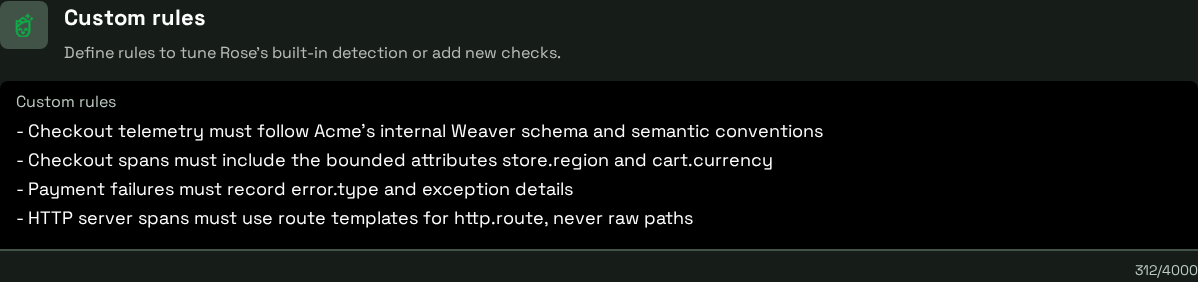
Focused rules cover the conventions that matter to your organization.
In this example, the first rule reports checkout instrumentation that does not follow Acme’s internal Weaver schema. See the resulting finding.
Write useful rules
Concise, specific, and testable rules work best. For example:
- “Flag checkout telemetry that doesn’t follow our internal Weaver schema.”
- “Flag span attributes named
customer.emailas sensitive data.” - “For HTTP server spans, flag raw URL paths used as span names.”
- “Flag metrics that use
user_idas an attribute because it creates unbounded cardinality.” - “In checkout handlers, check that payment authorization failures are recorded in trace telemetry.”
State the code or telemetry pattern to check and the result you expect. Avoid broad goals such as “make our observability better,” which don’t give Rose a clear test.
Document limits and rejected content
The current custom-rules document limit is 4,000 characters. Rules may be rejected when they try to override Rose’s instructions, contain links or network destinations, or include similar unsafe content.
If a rule is rejected, remove links and instruction-overriding language, reduce it to a plain description of the check, and try again. If it still doesn’t work, contact support with the rule’s purpose, but don’t include credentials, tokens, or secrets.
To see the effect of a rule, follow the next Review and inspect its findings.